

Battle Marine
SHOOT 'EM UP! Battle Marine is a simple naval barrage STG. A barrage of intense shots! Shoot 'em up! Shoot 'em up! Chain bombs with detonation, powerful laser sweeps, and jumps to collect medals! Enjoy a RETRO but NEW and exhilarating STG experience!
- Windows
- macOS
- Linux and SteamOS
At a glance
- Playing now
- Unknown
- Lowest price
- $4.99
- Never discounted
- Positive reviews
- 100%
- 8 reviews
- Released
- 27 Feb 2024
- Last patch
- 17 Feb 2026
- Patch notes on Steam
- Achievements
- 27
Steam hasn't returned a player count for Battle Marine. Its players may be counted under a separate launcher, or Steam hasn't counted them yet.
Trailers and screenshots
1 / 8
About this game
Overview
Battle Marine is a simple naval bullet-hell shoot ’em up (STG).
Fire rapid shots, trigger chain explosions, sweep enemies away with a powerful laser, and jump to automatically collect medals that restore LIFE or increase your score. Enjoy an exhilarating experience that feels both retro and fresh.
Destroy enemies in quick succession to keep your HIT combo going. Aim for 999 HITs!
Your rank is determined by your performance. Aim for Fleet Admiral!
Controls
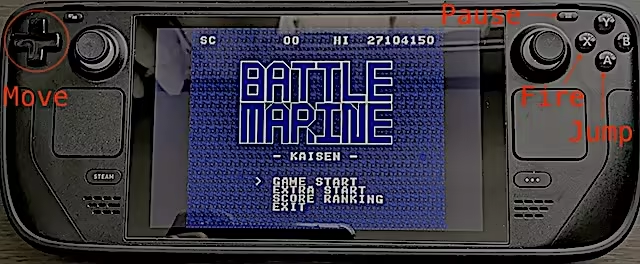
Use the D-Pad to move left and right, press X or B to fire, and press A or Y to jump.
Hold the fire button to charge the laser. Release the button at maximum charge to fire it.
Tap the jump button for a short jump, or hold it for a high jump.
Button assignments can be customized from “Edit Layout” by selecting the game-controller icon in the Steam client menu (shown only when a controller is connected).
Keyboard Controls
Cursor keys: D-Pad
X key: A button (Jump)
Z key: B button (Fire)
Space key: START button (can be changed in the key configuration)
To change the keyboard mappings, edit config.json.
The config.json file is stored at:
Windows: <SteamLibrary>\\steamapps\\common\\Battle Marine\\config.json
macOS: ~/Library/Application Support/Steam/userdata/<UserID>/2824990/local/config.json
Linux: ~/.local/share/Steam/userdata/<UserID>/2824990/local/config.json
On Windows, you can also customize the keyboard mappings from the window menu.
Detailed Gameplay
Destroying an enemy causes a green or yellow medal to appear.
Green medals restore LIFE.
Yellow medals increase your score.
Keep defeating enemies within 120 frames of one another to increase your combo. At 100 HITs or more, medals are collected automatically.
Jumping also collects medals automatically.
While firing the laser, you become invincible after the firing animation finishes.
Unlike most shoot ’em ups, explosions also damage enemies.
While your LIFE is full, continuing to collect green medals increases the base value of yellow medals.
For every 16 green medals collected while your LIFE is full, the number of crowns at the bottom of the screen increases.
Up to 30 crowns are displayed (480 green medals), but the counter itself continues up to 4,095 crowns (65,535 green medals).
Getting hit by enemy bullets reduces your LIFE and greatly decreases your crown count.
Except for certain enemies (crabs), enemies destroyed with the laser drop yellow medals.
Collecting a medal also resets the remaining combo time to 120 frames.
About the GBA Version
Purchasing the game on Steam includes the GBA ROM file as a bonus.
To find it, click the gear icon for Battle Marine in the Steam client and select “Manage” → “Browse local files.”
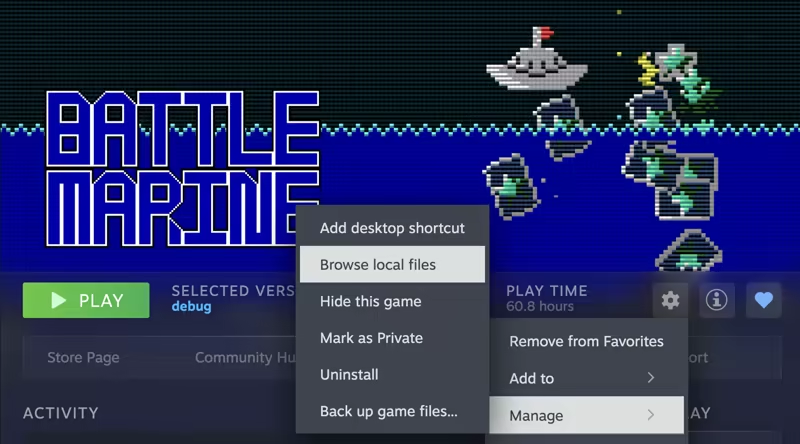
The GBA ROM file can be played with mGBA or another compatible emulator.
Video Streaming and Other Media
There are no restrictions on broadcasting gameplay footage on television or streaming it on YouTube or other video platforms.
Monetization is also unrestricted.
You do not need to contact the developer before or after publishing your content.
The same applies to publishing screenshots in magazines, on websites, or on social media: there are no restrictions.
About VGS-Zero
This game was developed using the VGS-Zero SDK.
VGS-Zero is a virtual game console powered by a fast 16 MHz Z80 CPU, a classic VDP (video display processor), and VGS (chip-tune sound system).
There are many games with an “8-bit style,” but games created with VGS-Zero are truly 8-bit.
If you would like to develop a game like Battle Marine, try building one with VGS-Zero.
Games created with VGS-Zero can be sold on Steam for Windows, Linux, and macOS using the VGS-Zero SDK for Steam.
Details
| App ID | 2824990 |
|---|---|
| Type | Game |
| Release date | 27 Feb 2024 |
| Developers | Yoji Suzuki, SUZUKIPLAN |
| Publishers | Yoji Suzuki, SUZUKIPLAN |
| Platforms |
|
| Languages | 1 languages |
| Achievements | 27 |
| Website | battle-marine.web.app (opens in a new tab) |
Game modes
- Single player
Perspective
- Side view
Also on
Sega Game Gear
Community tags
Ranked by player votes
- Action681 votes
- Arcade651 votes
- Shooter632 votes
- Boomer Shooter583 votes
- Bullet Hell573 votes
- 2D524 votes
- Spectacle fighter519 votes
- Pixel Graphics514 votes
- 1980s500 votes
- 1990's485 votes
- Retro480 votes
- War465 votes
News and updates
History
Players
Achievements
Prices and charts
Price in each region
| Region | Price | Discount | Lowest | Sale ends |
|---|---|---|---|---|
| South Africa | R 54,49 | - | - | |
| United States Your region | $4.99 | - | - | |
| Europe | 5,19 € | - | - | |
| United Kingdom | £4.59 | - | - |