

Feed Your T-Rex: Desktop Companion
A tiny T-Rex lives at the bottom of your screen while you work. Feed it rabbits, chickens and other critters. Once it's big enough, you can even feed it... humans! Decorate its Containment, keep it happy, and when it dies, use its DNA to breed an even better one.
Published by Mellow Monster
No user reviews: 0 user reviewsComing soon
- Windows
At a glance
- Release
- 31 Mar 2027
- In 124 days
- Languages
- 12
- Supported
Trailers and screenshots
1 / 8
About this game

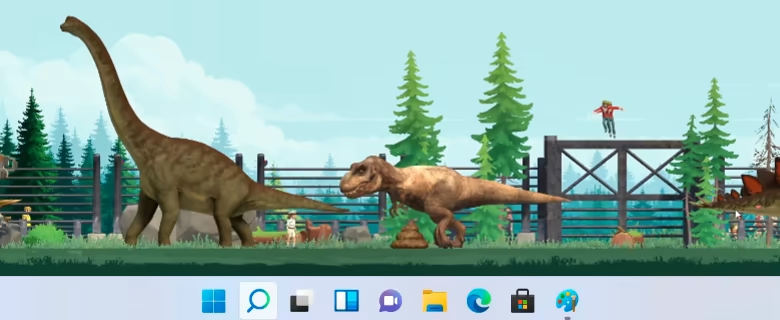
Feed your T-Rex. Keep it happy. Don't ask what's on the menu.
Feed Your T-Rex is a desktop companion that sits at the bottom of your screen while you work, study or play. Hatch a baby T-Rex from its egg, care for it and watch it grow into a full-size apex predator... one snack at a time.
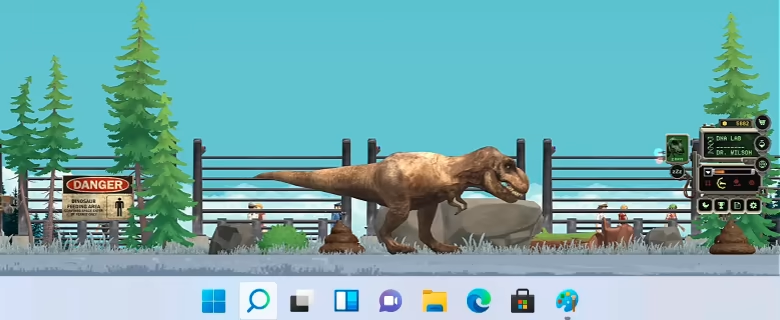
Feed it. Raise it. Breed a better one.
- Hatch and raise your Rex: start with an egg and grow your dinosaur from awkward juvenile to towering adult.
- Feed it: rabbits, chickens and other critters... and once it's big enough, the lab's human visitors.
- Keep it healthy and happy: watch its hunger, energy, happiness and health. A neglected Rex gets sick.
- Decorate the Containment: buy plants, decorations and other dinosaurs. A prettier Containment brings more visitors: the investors who keep your genetics lab running. Some of them leave tips. Some of them become lunch.
- Nothing goes to waste: what goes in must come out. Collect the poop and feed it to the DNA centrifuge.
- Genetics lab: when your Rex dies, harvest DNA from its bones to make the next egg stronger. Every generation can grow bigger and better than the last.
- Dress it up: caps, sheriff hats, sunglasses, moustaches, bandanas and other questionable fashion choices.
Made to stay open while you work
- Lives in a strip at the bottom of your screen, out of the way of your windows.
- Lightweight, with Low / Mid / High / Ultra graphics presets.
- Check in between tasks, feed your Rex and get back to work.
Game FAQ
Will it slow down my PC?It's lightweight. Pick the Low / Mid / High / Ultra graphics preset in Settings, and turn on Power Saver to lower the frame rate when you're not interacting with it.
Can I put it on my other monitor?
Yes. Choose the monitor in Settings → Display.
I want it out of the way for a while.
Use the minimize button, or turn off Pin Window in Settings so it no longer stays on top of your other windows.
My taskbar is set to auto-hide and it won't show up while the game is open.
Press the Windows key and your taskbar will show up again.
The Steam overlay or notifications look weird over the game.
In your Steam Library, right-click the game → Properties → General → turn off the Steam Overlay while in-game. This only affects this game.
The game changed my wallpaper. How do I get mine back?
It only changes it if you buy a wallpaper and confirm. Press RESTORE on that wallpaper in the shop to bring yours back.
Does my Rex keep living while the game is closed?
No. Time only passes while the game is open, so your Rex won't starve while you're away.
Is my progress saved?
Yes. It autosaves every 30 seconds and when you quit, and your demo progress carries over to the full game.
Details
| App ID | 2668410 |
|---|---|
| Type | Game |
| Planned release | 31 Mar 2027 |
| Developers | Óscar Gutiérrez, MrMellows |
| Publisher | Mellow Monster |
| Platforms |
|
| Languages | 12 languages |
| Website | mellowmonster.games (opens in a new tab) |
Community tags
Ranked by player votes
- Casual1K votes
- Desktop Companion924 votes
- Idler825 votes
- Simulation808 votes
- Relaxing775 votes
- Cute726 votes
- Management577 votes
- Building544 votes
- Incremental511 votes
- Dinosaurs445 votes
- Life Sim412 votes
- Character Customization379 votes